
How to Analyze VirusTotal Results
VirusTotal is a powerful tool, but is also extremely confusing to the average person. Here's how you can make sense of the results and determine if a file/link is actually legitimate:
Brief introduction
VirusTotal analyzes submitted files and URLs against over 70 antivirus engines and web analysis tools. They run dozens of tools to extract several signals.
You can upload both files and links to VirusTotal. These are called "samples". Samples submitted to VirusTotal are public and are shared with the security community. This means personal files should NOT be uploaded.
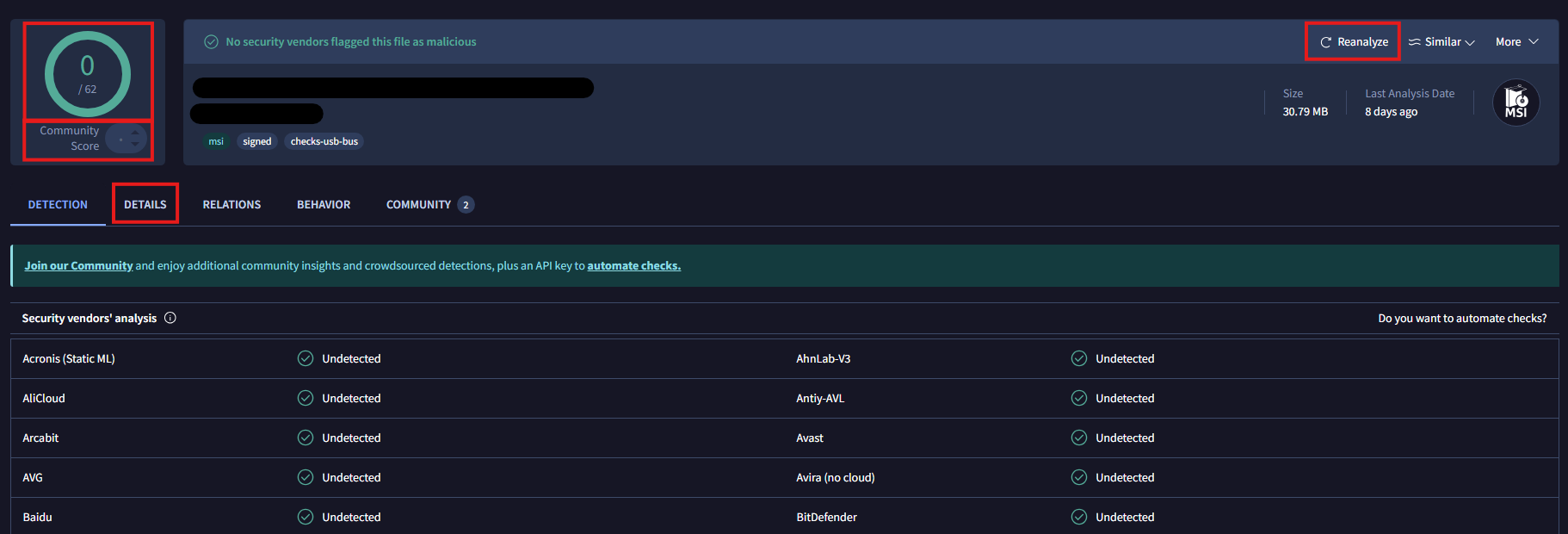
VirusTotal is useful because it scans against many databases, but that also makes it confusing. Does it matter if there is 1 detection on something or does it not? False positives exist and are actually common. As with all things in cybersecurity, everything carries a risk, we just need to determine how risky something is.
Determining Risk
Risk is subjective. So please keep in mind that these are our recommendations and are not mandatory to follow.
| Points | Risk Level |
|---|---|
| ≥ 7 | Almost certainly malicious |
| 3–6 | Probably malicious |
| 0–2 | Possibly malicious |
| -4–1 | Likely safe |
| ≤ -5 | Almost certainly safe |
For files,
- Detections:
- ≥3 AV detections: +4 points
- 1 detection from a reputable AV: +5 points
- Community score:
- Red: +3 points
- Green: −3 points
- Gray: 0 points
- Source scan (the website you downloaded from):
- 0 detections: -2 points
- ≥2 detections +3 points.
- First submission: if submitted >30 days ago, −3 points.
- Valid digital signature: if "Signed file, valid signature" present, −4 points.
For links,
- Detections:
- ≥3 AV detections: +4 points
- 1 detection from a reputable AV: +5 points
- Community score:
- Red: +3 points
- Green: −3 points
- Gray: 0 points
- First submission: if submitted >30 days ago, −3 points.
Conclusion
VirusTotal is a really good tool if used correctly. It can generate a lot of false positives but using it with this system makes it even more powerful. If you want to protect yourself against cyber threats but hate the generic advice of "choose a secure password", "enable 2 factor authentication" and just want easy set-it and forget-it solutions, we recommend you read our blog post on 5 effective protection strategies.